 Scan to install
SafeMyPhone on Google Play
Scan to install
SafeMyPhone on Google Play
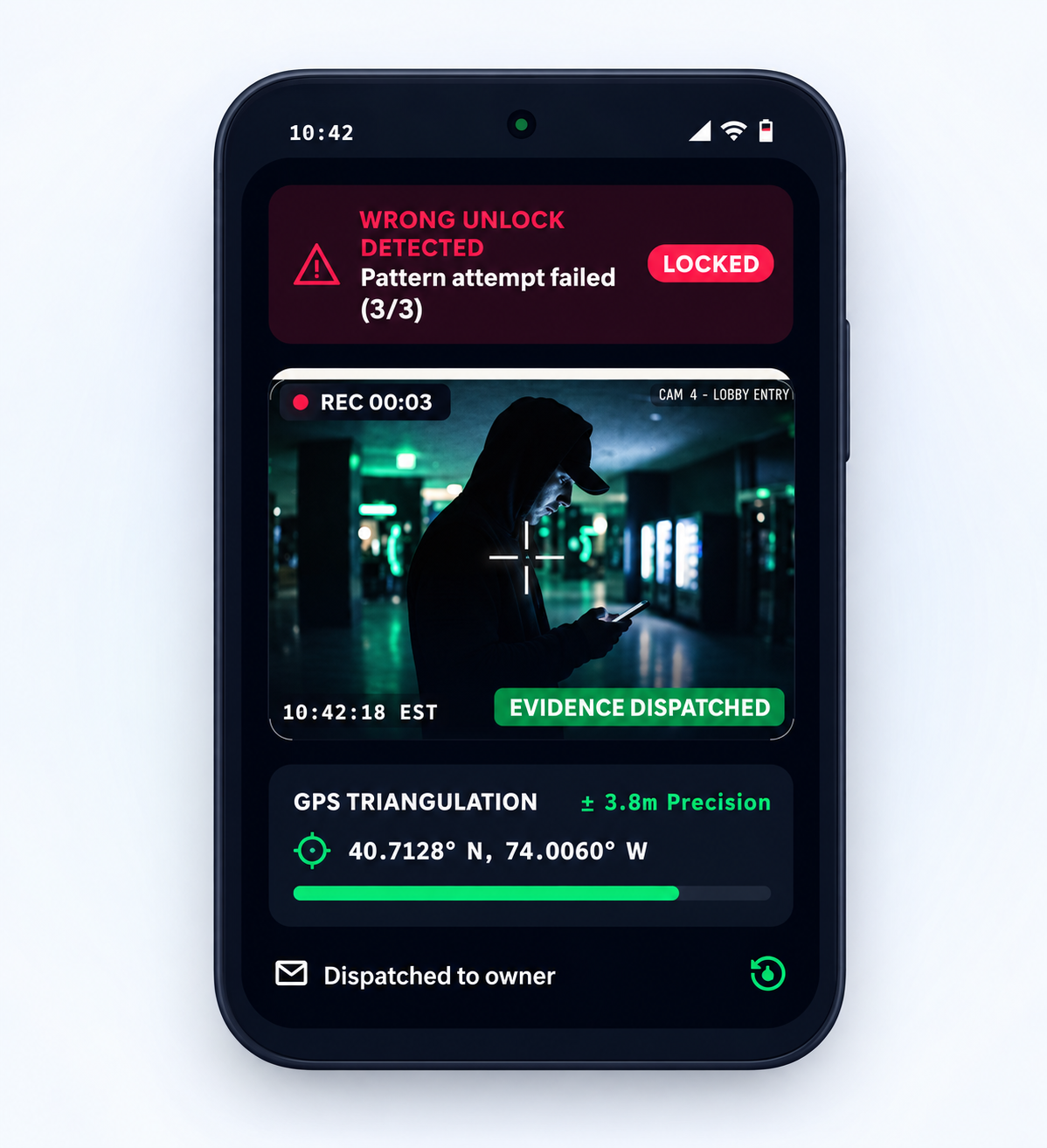
Wrong unlock attempt
When someone enters the wrong PIN, password, or pattern, SafeMyPhone starts the protection flow quietly.
 SafeMyPhone
Android phone recovery
SafeMyPhone helps protect your Android phone with intruder photos and GPS email alerts after supported unlock attempts. Install and set it up before your phone goes missing, then keep your private recovery key somewhere safe.


YOUR NEXT STEP
Protect a phone you have, access your saved evidence, or find out what to do next.
A little preparation goes a long way. Set up alerts and keep your recovery key somewhere safe.
Setup & permissions guideGet startedUse your recovery key to check the available alerts and evidence from your protected phone.
Your recovery key is requiredAccess recoveryEven without SafeMyPhone set up, explore tracking options and ways to secure your accounts.
A practical recovery checklistGet recovery helpSafeMyPhone protection needs prior setup. Features vary by device and permissions. Sending alerts requires internet access.
How it works
Once installed and configured, SafeMyPhone watches for security triggers in the background and sends the owner useful evidence quickly.
When someone enters the wrong PIN, password, or pattern, SafeMyPhone starts the protection flow quietly.
You receive an email alert with intruder photos, the latest location, time, and useful recovery details.
Use the evidence with your community or local authorities to help track and recover the phone safely.
Features
Essential tools are free. Pro unlocks advanced security features for stronger evidence, better hiding, and faster recovery.
Capture intruder photos after wrong unlock attempts so you can see who touched your phone.
Get GPS coordinates, accuracy, and map details when SafeMyPhone sends a recovery alert.
Receive photos, location, time, and device details in your configured owner email inbox.
Build stronger evidence with video that can capture the thief's voice and movements.
Access evidence from anywhere with photos and videos saved automatically to Google Drive.
Capture the surroundings too, so you can see where the phone may be hidden.
Show a direct return message on the phone screen to encourage the finder to give it back.
Startle thieves and alert nearby people with a loud alarm after a security trigger.
Trick thieves into thinking they unlocked your phone while SafeMyPhone collects more evidence.
Protect SafeMyPhone with a pattern lock so thieves cannot open the app and disable protection.
Make SafeMyPhone look like a file explorer so thieves are less likely to find it.
Catch smarter thieves even when they guess your password by sending security alerts.
Keep alerts discreet by customizing email subjects so notifications stay private.
Stay invisible by showing sensitive notifications only after the owner unlocks the phone.
Help prevent thieves from disabling the phone by limiting access to the power menu.
Secure recovery
If your phone is lost or someone tries to unlock it, SafeMyPhone helps turn panic into action. The app can collect useful evidence, send it to your email, and let only the verified owner check the latest recovery result from safemyphone.com.
Trust and privacy
Lost-phone tools handle sensitive photos, locations, and device details. SafeMyPhone explains the permissions it needs and keeps recovery checks tied to owner verification.
Recovery details are designed to stay behind a private key, owner contact, and verification answer before sensitive results appear.
The site shows the exact recovery signals users care about: intruder photos, GPS location, voice, video, timestamps, and email alerts.
Camera, location, notification, internet, and security permissions are explained in plain language so users know why each one matters.
FAQ
Answers about setup, permissions, privacy, and phone recovery.
SafeMyPhone can silently capture intruder photos, collect GPS location details, and email an alert to the owner.
Yes. Open safemyphone.com from another phone, PC, or laptop, click Find My Phone, enter the private key, answer owner-verification questions, and view the latest recovery result.
Install SafeMyPhone on a phone you own, add your recovery email, enable only the protections and Android permissions you want, test the alerts, and keep your private recovery key somewhere safe outside the protected phone.
If the phone has no internet, SafeMyPhone can store alerts and retry sending them after the device reconnects.
SafeMyPhone can be downloaded for free, with optional Pro security features available as an upgrade.
A private recovery key is a secret code generated for the phone owner. It helps identify the correct device recovery record without showing private information publicly.
The recovery page can check the private key plus owner questions such as the registered contact, phone model, device nickname, or a security answer set inside the app.
SafeMyPhone can capture intruder photos after wrong unlock attempts when the required Android permissions are enabled.
Yes. SafeMyPhone can email GPS coordinates, accuracy, time, and map details to the owner after a security trigger.
SafeMyPhone may need camera, location, notification, internet, and security-related permissions so it can capture evidence and send alerts.
SafeMyPhone is designed to stay discreet. Pro options can help hide sensitive notifications until the owner unlocks the phone.
Pro features can include video capture, voice recording, Google Drive upload, back camera capture, alarm sound, fake home screen, app lock, app disguise, break-in detection, custom email subjects, and hidden notifications.
Blocking power off and Airplane mode is listed as an experimental feature because Android device models and system versions handle power menu control differently.
SafeMyPhone is designed to run in the background and act mainly when a security trigger happens, which helps reduce unnecessary battery use.
Recovery data should be protected by your private key and backend security. Photos, location, and alerts should only be shown to the verified phone owner.
A factory reset can remove installed apps and local data. SafeMyPhone is most useful before that happens, when it can send photos, location, and alerts.
Phone recovery guides
Phone missing, switched off, or stolen? Choose a guide to check your recovery options, secure your accounts, and prepare your next phone.
Understand location limits, official finding tools, and carrier or CEIR blocking.
SolutionExplore photo alerts, location evidence, and protection options for your Android.
RecoveryPrepare alerts, private keys, and safe next steps before panic hits.
DetectionUnderstand what intruder photos, GPS alerts, and timestamps can tell you.
Lost PhoneUse official trackers, secure accounts, and review recovery evidence.
Stolen PhoneStep-by-step actions for tracking, carrier support, and reporting.
OfflineUnderstand last known location, reconnection, and offline retry.
RecoveryPrepare alerts, private keys, and evidence before the phone disappears.
EvidenceLearn how wrong unlock attempts can capture useful evidence.
LocationSee why coordinates, accuracy, and map links matter.
ComparisonCompare official Android tracking with intruder evidence alerts.
Start now
Install SafeMyPhone free, choose the recovery permissions you want to enable, configure your alert email, and keep your private recovery key somewhere safe.